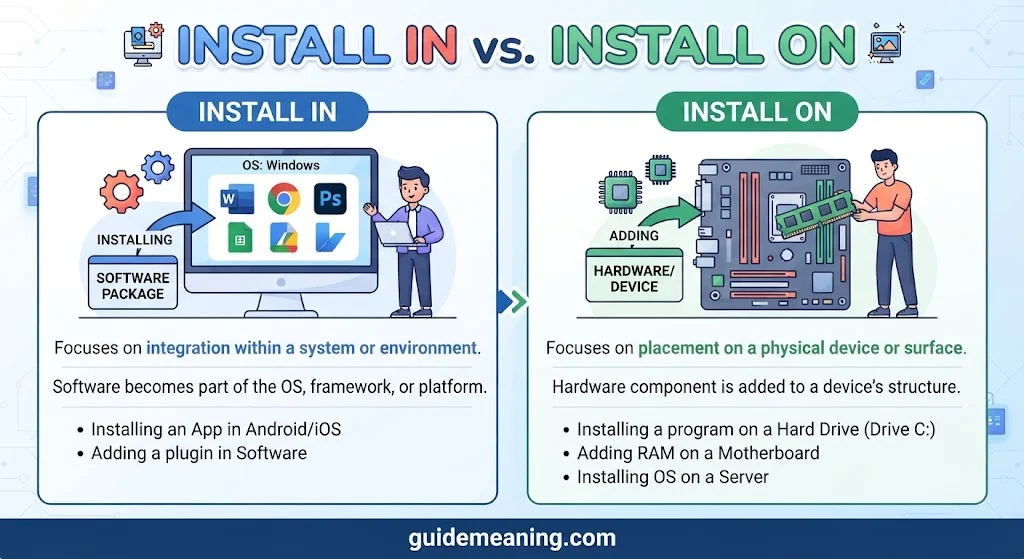

In the world of technology, context changes everything when choosing between these phrases. Install in usually refers to placing something inside a specific area, such as a directory, file system, or directory structure. Install on, however, can describe placing or adding something onto a surface or platform such as a device, operating system, app, or phone. This simple shift makes the phrase comparison and grammar choice easier to understand. For example, software installation can involve an internal location within a system platform, while an app can work with a mobile device or desktop device.
This installation terminology appears throughout everyday tech language, a digital environment, and broader system platform settings. A software app, physical part, hardware placement, and different installation action can each have a different placement meaning. Understanding contextual meaning also improves usage rules, correct usage, smart word selection, an accurate platform reference, and a container reference. From my years of teaching, I’ve found that a practical explanation often removes doubt more effectively than random tips.
When you dive into details, the pattern becomes obvious, and the structural difference becomes easier to apply. A system application may have specific location specificity, while a physical part can have a different relationship with a device or surface. This distinction helps reduce user uncertainty and prevents a common mistake in precise technology writing. An instructional guide should connect the right preposition with the intended location and action. In clean English grammar, phrase accuracy, communication clarity, and language clarity depend on understanding the semantic distinction, not simply memorizing a rule. Your focus should remain on applied context, proper context, and usage rules because the context determines which phrase fits naturally.
Let’s jump in!
Quick Answer:
Use install on when you are talking about a device, computer, server, operating system, or platform.
- Install the app on your phone.
- Install the software on your laptop.
- Install the program on Windows.
- Install the update on the server.
Use install in when you are talking about an internal place, folder, directory, room, building, machine, or enclosed space.
- Install the files in this folder.
- Install the program in the specified directory.
- Install the equipment in the laboratory.
- Install the new engine in the car.
A useful shortcut is:
ON = the host, device, or platform
IN = an internal place or specific location
However, this isn’t an absolute rule for every possible use of install. Context matters. For physical equipment, for example, something can be installed on a surface or in an enclosed space.
| Expression | Typical use | Example |
| install on | Device or platform | Install the app on your phone. |
| install on | Computer | Install the software on your computer. |
| install on | Operating system | Install the program on Windows. |
| install on | Server | Install the application on the server. |
| install in | Folder | Install the files in the folder. |
| install in | Directory | Install the package in the directory. |
| install in | Physical space | Install the equipment in the laboratory. |
| install in | Internal part of a machine | Install the component in the machine. |
What Does “Install” Mean?
Before choosing a preposition, it helps to understand what install actually means.
The verb generally means to put something into position and make it ready for use. This applies to both physical equipment and software. Cambridge gives examples involving machines and equipment as well as computer programs.
For example:
- The technician installed a new washing machine.
- The company installed security cameras.
- I installed a new app.
- We installed the software on several computers.
The object being installed can therefore be physical or digital.
That matters because the preposition isn’t controlled by the word install alone. The surrounding noun determines what kind of location you mean.
Consider these two sentences:
I installed the app on my phone.
I installed the files in the application folder.
Both sentences describe installation. Yet on and in work because they identify two different destinations.
The phone is the host device.
The application folder is an internal location within that system.
When to Use “Install On”
Install on is especially common in modern technology English. When you tell someone that software is being added to a device or platform, on is normally the natural choice.
Install On a Phone
Use on when the phone is the device receiving an app, program, update, or other software.
Examples:
- Install the app on your phone.
- I installed the game on my smartphone.
- She installed the update on her phone.
- The application is already installed on my device.
You wouldn’t normally say:
❌ I installed the app in my phone.
In standard modern English, on my phone is the natural expression.
Why? English commonly treats a phone as the device or platform on which software operates.
The same pattern appears in ordinary expressions such as:
- watch something on your phone
- play a game on your phone
- browse the web on your phone
- use an app on your phone
Installation follows the same conceptual pattern.
Install On a Computer or Laptop
The same rule applies to computers.
- Install the program on your computer.
- I installed Microsoft Office on my laptop.
- The technician installed the software on the desktop computer.
- You can install the application on your PC.
This is one of the most important cases to remember.
If you’re talking about software + computer, install on will usually be the right choice.
Cambridge specifically describes computer installation as putting software onto a computer so the computer can use it.
Install On an Operating System
Operating systems are also commonly treated as platforms.
For example:
- Install the program on Windows.
- The application works on macOS.
- Install the package on Linux.
- The update can be installed on Android.
Here, on doesn’t mean that the software is physically sitting on a surface.
Instead, the operating system functions as the environment or platform where the software operates.
That’s an important point. Prepositions in English aren’t always literal descriptions of physical space.
Install On a Server
A server can also act as the host for software.
Examples include:
- Install the application on the server.
- The database software is installed on the server.
- We need to install the update on the production server.
- The administrator installed the package on the Linux server.
Again, on identifies the machine or system that hosts the software.
When to Use “Install In”
Install in becomes natural when you identify an internal location rather than the overall device or platform.
This can refer to a physical space or a specific digital location.
Install In a Folder
This is one of the clearest technical uses of install in.
Examples:
- Install the files in this folder.
- The program was installed in the Applications folder.
- Put the plugin in the extensions folder.
- The installer places the files in the selected folder.
A folder is a location inside a file system. That’s why in makes sense.
Compare:
Install the software on your computer.
with:
Install the files in the software folder.
The first sentence identifies the host.
The second identifies a specific internal location.
Install In a Directory
The same logic applies to directories.
- Install the package in the project directory.
- The files are installed in the system directory.
- Install the component in the specified directory.
- The application creates several files in its installation directory.
Technical discussions often need to distinguish between the computer as a whole and a particular location inside its file system.
That’s where in becomes useful.
Install In a Physical Space
The phrase isn’t limited to computers.
You can use install in when something is physically placed inside a building, room, vehicle, machine, or other enclosed space.
Examples:
- Install the new equipment in the laboratory.
- They installed a security system in the building.
- The mechanic installed a new component in the vehicle.
- The workers installed new wiring in the house.
- The company installed additional equipment in the factory.
Cambridge’s examples show this broader physical use of install, including equipment and systems placed in buildings and other locations.
Install In vs. Install On: The Main Difference
The easiest way to understand install in vs. install on is to identify the type of location.
On usually points to the host, platform, device, or surface.
In usually points to an internal space or specific location.
Think of a laptop as a large map.
The laptop itself is the host:
Install the software on the laptop.
Inside that laptop’s file system, you might have a particular folder:
Install the files in the software folder.
Both statements can be true at the same time.
Side-by-Side Comparison
| Situation | Natural phrase | Example |
| App + phone | install on | Install the app on your phone. |
| Software + laptop | install on | Install the software on your laptop. |
| Program + Windows | install on | Install the program on Windows. |
| Application + server | install on | Install the application on the server. |
| Files + folder | install in | Install the files in the folder. |
| Package + directory | install in | Install the package in the directory. |
| Equipment + building | install in | Install the equipment in the building. |
| Component + machine | install in | Install the component in the machine. |
| Camera + wall | install on | Install the camera on the wall. |
| Engine + car | install in | Install the engine in the car. |
The last two examples show why the rule isn’t simply “technology = on” and “everything else = in.”
The actual relationship matters.
Why “Install In My Computer” Usually Sounds Wrong
One of the most common questions is whether you should say:
Install the software in my computer.
or:
Install the software on my computer.
For ordinary software installation, on my computer is the standard choice.
The computer is being treated as the device on which the program operates.
So write:
I installed the software on my computer.
Not:
❌ I installed the software in my computer.
However, in can become correct if you identify a specific internal location.
For example:
I installed the files in a folder on my computer.
Notice the two levels:
computer → folder
The software is installed on the computer.
The files are installed in the folder.
This distinction resolves much of the confusion surrounding this topic.
Can “Install In” and “Install On” Appear Together?
Absolutely.
In fact, using both can make a sentence more precise.
Consider:
Install the program on your computer in the specified folder.
Here, on your computer tells us the host device.
In the specified folder tells us the more precise internal location.
Another example:
The application is installed on the server in the main application directory.
The server is the host.
The directory is the internal location.
This layered structure is especially useful in technical writing because computers contain many nested locations.
Install In vs. Install On for Technical Writing
Technical writing needs extra precision because a single sentence may refer to a device, operating system, server, directory, or environment.
Software Installation
For general software installation, on is usually preferred when naming the host.
Examples:
- Install the software on the computer.
- Install the application on the server.
- Install the driver on Windows.
- Install the app on your tablet.
If you move from the host to a particular directory, in becomes appropriate.
- Install the files in the application directory.
- Install the plugin in the extensions folder.
Programming and Package Installation
Programming adds another layer because developers frequently refer to environments and directories.
You may see phrases such as:
- install files in a directory
- install modules in an environment
- install software on a server
- install a tool on Linux
The exact wording depends on what noun follows the preposition.
Don’t force every technical situation into one simple formula.
Servers and Cloud Systems
Server terminology can also vary depending on what you’re describing.
For example:
Install the application on the server.
Here, the server is the host.
But:
Install the configuration files in the server directory.
Now the sentence identifies an internal location.
The same distinction works with many other technical contexts.
Read More: Throughout the Years vs. Over the Years: Meaning, Difference, and Correct Usage for 2026
Install In vs. Install On for Physical Objects
The difference becomes even clearer when you leave the digital world.
Things Installed Inside Something
Use in when the installed object goes inside an enclosed structure.
Examples:
- Install a new engine in the car.
- Install a battery in the device.
- Install new wiring in the building.
- Install a heating system in the house.
- Install a new component in the machine.
Here, in expresses an internal location.
Things Installed on a Surface
Use on when the object is attached to or positioned on a surface.
Examples:
- Install solar panels on the roof.
- Install a camera on the wall.
- Install a rack on the vehicle.
- Install a sign on the door.
- Install lights on the ceiling.
The physical relationship is different.
The object isn’t being placed inside the surface. It’s being attached to or positioned on it.
Install In vs. Install On: Common Mistakes
Small prepositions can create surprisingly awkward sentences. Here are the mistakes worth avoiding.
❌ Install the App in My Phone
Use:
Install the app on my phone.
The phone is the host device.
❌ Install the Software in Windows
Use:
Install the software on Windows.
Windows is being treated as the operating platform.
❌ Install the Files on the Folder
Use:
Install the files in the folder.
A folder is an internal location.
❌ Install the Program on the Directory
Use:
Install the program in the directory.
A directory represents a location within a file system.
❌ Install the Engine on the Car
If you mean the engine is placed inside the car, use:
Install the engine in the car.
However, if you’re talking about an external component attached to the vehicle, on may be correct.
For example:
Install the roof rack on the car.
The important question is not simply whether the noun is a car. Ask where the object is positioned in relation to it.
Install In vs. Install On vs. Install To
There’s another preposition worth knowing: to.
Technical English sometimes uses install to when referring to a particular destination, especially a drive, path, or installation location.
For example:
Install the software to the selected directory.
However, usage varies across technical contexts. Some writers prefer install in or install into, while software documentation may use install to when describing a selected destination.
This means you shouldn’t automatically replace every instance of in with to.
Compare:
- Install the application on the computer.
- Install the files in the application folder.
- Install the package to the selected location.
Each construction emphasizes a slightly different relationship.
A usage discussion on English Stack Exchange similarly distinguishes on for the computer and in for a particular directory, while noting variation around to in technical contexts.
For ordinary learner-focused writing, the safest approach is to choose the preposition that clearly expresses the relationship you mean.
Install In vs. Install On vs. Install Into
Into is useful when you want to emphasize movement from outside to inside.
Compare:
Install the component in the machine.
and:
Insert the component into the machine.
The second sentence emphasizes movement into the interior.
With install, in is often more natural when simply describing the final position:
The technician installed the component in the machine.
Into can appear when the movement or destination receives special emphasis, especially in technical instructions.
Install In vs. Install Inside
Inside is more explicit than in.
Compare:
Install the equipment in the cabinet.
Install the equipment inside the cabinet.
Both can work when the equipment is physically enclosed.
However, inside puts stronger emphasis on the fact that the equipment is within the cabinet.
In most ordinary sentences, in is shorter and more natural.
Install On vs. Install At
At usually identifies a point or location rather than the relationship between the installed object and its destination.
For example:
The system was installed at the airport.
Here, at the airport identifies the general location where installation took place.
Compare that with:
The security system was installed in the airport terminal.
Here, in identifies the physical space containing the system.
And:
The cameras were installed on the terminal walls.
Here, on identifies the surface receiving the cameras.
All three can be grammatical because they answer slightly different questions.
| Preposition | Main idea | Example |
| in | Inside a place | installed in the building |
| on | On a surface or host/platform | installed on the wall |
| at | General point/location | installed at the airport |
A Real-World Case Study: Installing Software on a Laptop
Imagine that you’re helping a friend install a photo-editing program.
First, you might say:
Install the photo editor on your laptop.
You’re identifying the device.
Then the installer asks you to choose a location.
You select a particular folder.
Now you could say:
Install the program in the Applications folder.
Finally, you might explain:
The program is installed on your laptop in the Applications folder.
Nothing contradictory is happening.
The three levels simply provide increasing detail:
Laptop → folder → files
This is why understanding the underlying relationship is more useful than memorizing isolated sentences.
Another Case Study: Installing Hardware in a Car
Now imagine a mechanic replacing an engine component.
You could say:
The mechanic installed the component in the car.
The component goes inside the vehicle.
But suppose the mechanic adds a roof rack.
You would say:
The mechanic installed the roof rack on the car.
The car hasn’t changed. The physical relationship has changed.
The component goes inside.
The roof rack attaches externally.
That’s the heart of the distinction.
A Practical Decision Guide for “Install In” vs. “Install On”
When you’re unsure, ask yourself these questions.
Is the destination a device or platform?
If yes, on is usually appropriate.
- on a phone
- on a computer
- on a laptop
- on a server
- on Windows
- on Android
- on macOS
Is the destination a folder or directory?
If yes, in is usually appropriate.
- in a folder
- in a directory
- in a project directory
- in the system folder
- in the application directory
Is the object physically inside something?
If yes, in is usually appropriate.
- in the car
- in the machine
- in the building
- in the cabinet
- in the wall
Is the object attached to a surface?
If yes, on is usually appropriate.
- on the wall
- on the roof
- on the ceiling
- on the door
- on the vehicle
Install In vs. Install On: Quick Reference Table
| Word after install | Usually use | Example |
| phone | on | Install it on your phone. |
| tablet | on | Install it on your tablet. |
| laptop | on | Install it on your laptop. |
| computer | on | Install it on your computer. |
| server | on | Install it on the server. |
| Windows | on | Install it on Windows. |
| Android | on | Install it on Android. |
| macOS | on | Install it on macOS. |
| folder | in | Install it in the folder. |
| directory | in | Install it in the directory. |
| building | in | Install it in the building. |
| room | in | Install it in the room. |
| machine | in | Install it in the machine. |
| car interior | in | Install it in the car. |
| wall | on | Install it on the wall. |
| roof | on | Install it on the roof. |
| ceiling | on | Install it on the ceiling. |
The Easiest Memory Trick
Here’s a simple way to remember install in vs. install on:
ON = host, platform, or surface.
IN = internal space or specific location.
Imagine your computer as a building.
The computer is the building.
A folder is a room inside it.
You install the software on the computer.
You install the files in the folder.
That mental picture is much easier to remember than a long grammar rule.
FAQs:
What is the difference between install in and install on?
Install in usually refers to placing or adding something inside a specific location, such as a directory, folder, or system area. Install on usually refers to installing software or an app on a device, operating system, or platform.
Is it correct to say install in a computer?
It can be correct when you mean installing something inside a specific part or location of a computer system. However, when you mean installing software on the computer as a whole, install on a computer is generally the more natural expression.
Should I say install an app in or on my phone?
The natural choice is usually install an app on my phone. Here, the phone is the device or platform that receives the app, so on fits the context.
When should I use install in?
Use install in when the context focuses on an internal location, such as installing a file or component in a particular directory, folder, or system location.
When should I use install on?
Use install on when you are talking about a device, platform, or operating system where software or an app is installed. For example, you can install a program on a desktop computer.
Why do people confuse install in and install on?
People often confuse them because in and on can express location in ways that vary by context. Technology adds another layer because software can exist inside a system while also being installed on a device.
Is install on more common in technology?
Install on is very common when referring to software, apps, computers, phones, and other devices. However, install in remains useful when you need to identify a specific internal location, such as a directory or folder.
Conclusion:
Understanding install in vs. install on becomes easier when you focus on the location being described. Use in when the idea is an internal place or specific area, and use on when referring to a device, platform, or operating system. Instead of memorizing random rules, look at the context and ask what you are actually describing. That simple habit can improve your grammar choice, phrase accuracy, and confidence in modern technology writing.




1 thought on “Install In vs. Install On: What’s the Difference ? 2026”